Rescreen / Alternatives / Loom pricing
Loom pricing
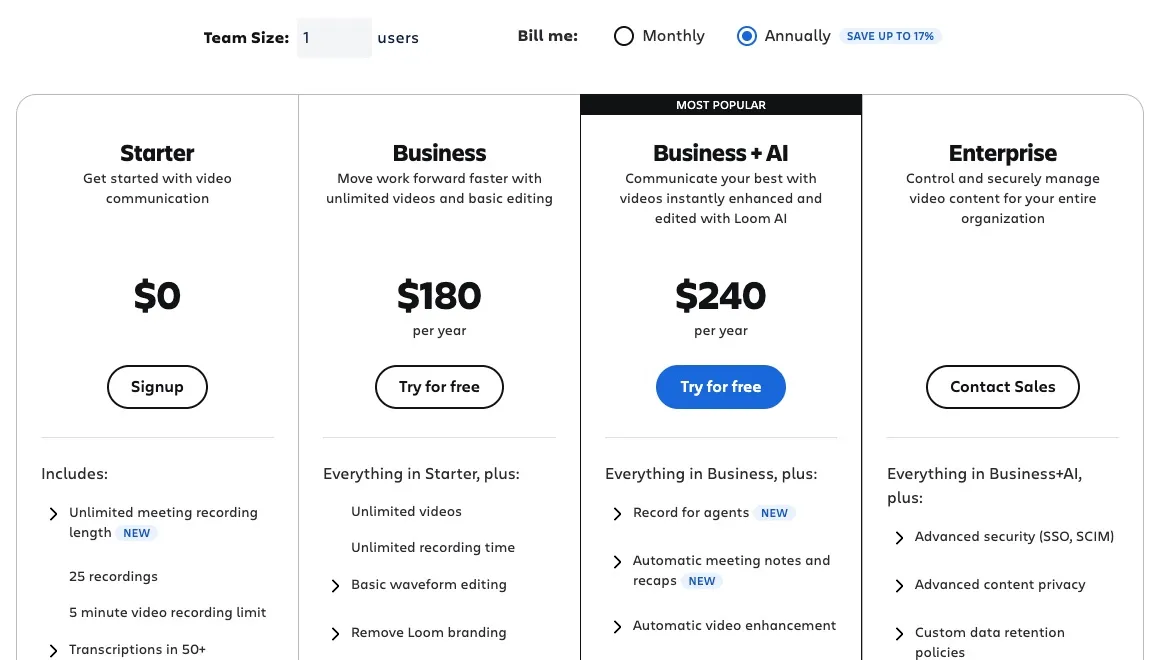
Loom Business costs $15 a user a month, billed $180 yearly, or $18 paid monthly. Loom is free on the Starter plan, with up to 25 videos of five minutes each.
Rescreen is our product. We checked these prices on 9 Nov 2026.
Choose Loom if
- Your team already works in Jira and Confluence and wants video in the same place.
- You want a desktop app with speaker notes, or a Chrome extension.
- You want Zoom, Meet and Teams calls recorded with notes and a recap written for you.
- You need single sign-on, SCIM and retention rules across a company.
Choose Rescreen if
- You record walkthroughs longer than five minutes and do not want to pay to share them.
- You want filler words, silences and dead time cut for you on the free plan, without a separate step.
- You want to record in the browser with nothing to install.
Loom plans and prices
| Plan | Billed monthly | Billed yearly | What it adds |
|---|---|---|---|
| Starter | Free | Free | 25 videos and screenshots per person, five-minute recordings, up to 720p, transcripts, comments and reactions. Up to 10 users in a new workspace. |
| Business | $18 / user / month | $15 / user / month ($180 a year) | Unlimited videos and recording time, recording up to 4K, trim and stitch, uploads and downloads, password-protected videos, no Loom branding and engagement insights. |
| Business + AI | $24 / user / month | $20 / user / month ($240 a year) | Filler word and silence removal, editing by transcript, automatic summaries and chapters, meeting notes and recaps, and AI that turns a video into a document or issue. |
| Enterprise | On request | On request | Single sign-on and SCIM through Atlassian Guard Standard, custom data retention, control over public links, a Salesforce integration and a 99.95% uptime SLA. Billed yearly only. |
Prices in USD before tax. Sources: atlassian.com, checked 9 Nov 2026.
Is Loom free?
Yes, with limits. Loom’s Starter plan costs nothing and has no time limit, but each person can keep 25 videos and screenshots, and each recording stops at five minutes.
- Recordings on Starter stop at five minutes. Business and the plans above it have no limit on recording time.
- The 25-video limit counts screenshots and archived videos too. Once you reach it, Loom keeps your videos but you cannot record more until you delete some or upgrade.
- Starter records at up to 720p. Business and above record at up to 4K.
- Starter has no trimming or stitching, no downloads or uploads, no password-protected videos and no custom branding. Filler word removal, silence removal and editing by transcript need Business + AI.
- Meeting recordings from Zoom, Google Meet and Teams have no length limit on any plan, Starter included.
- A workspace created after February 2026 runs on Atlassian’s systems and is limited to 10 users on Starter. Older workspaces that have not moved to Atlassian can still have up to 50 free Creator Lite members.
Sources: support.atlassian.com, checked 9 Nov 2026 · atlassian.com, checked 9 Nov 2026.
What changed in 2026
- Loom now belongs to Atlassian and is sold on Atlassian’s site. Workspaces created after February 2026 are set up on Atlassian’s systems. An older workspace that has been moved shows a notice in its Workspace Settings.
- On an Atlassian workspace, the free Starter plan is limited to 10 users. A team that grew past 10 on Starter has to pay, or remove people, to stay on Loom.
- On an Atlassian workspace, you cancel or downgrade in Atlassian Administration, and only billing or organization admins can do it. Older workspaces cancel from Loom’s own Plan & Billing settings.
- The free Education plan is closed to new applicants. Verified teachers and students now get a discount on paid plans instead: up to 50% off for academic use, or 75% for classroom use.
Sources: support.atlassian.com/loom/docs/starter-plan-faq, checked 9 Nov 2026 · support.atlassian.com/loom/docs/loom-business-ai-trial-faq, checked 9 Nov 2026 · support.atlassian.com/loom/docs/downgrade-or-cancel-your-loom-plan, checked 9 Nov 2026 · support.atlassian.com/loom/docs/loom-education-discount-verification, checked 9 Nov 2026.
Loom free trial
- Every new workspace can try Business + AI free for 14 days, and you are not charged during the trial.
- If no card is on file when the trial ends, the workspace drops to Starter. With more than 10 users it has a 14-day grace period to add a card or remove people before Loom deactivates it.
- After a downgrade you keep every video, but you cannot record again until you are under 25 videos, and trimming, custom branding and engagement insights go away.
- Enterprise trials are arranged case by case with Atlassian’s sales team.
Sources: support.atlassian.com/loom/docs/loom-business-ai-trial-faq, checked 9 Nov 2026 · support.atlassian.com/loom/docs/loom-billing-faq, checked 9 Nov 2026.
How to cancel a Loom subscription
- On an Atlassian workspace: open Billing in Atlassian Administration, choose Subscriptions, find Loom and select Manage, then Deactivate. You can downgrade to Starter or cancel outright.
- On an older Loom workspace: open Workspace Settings, then Plan & Billing, select Manage Subscription and choose Downgrade to Starter.
- Either way, paid features stay until the end of the billing period and you are not charged again. A Business + AI trial needs no cancelling: it ends on its own.
Sources: support.atlassian.com, checked 9 Nov 2026.
Which Loom plan you need
- Starter fits someone who sends a few short replies: a quick bug report, a code review or a hello. Everything over five minutes, or past 25 videos, needs a paid plan.
- Business fits people who record longer walkthroughs and need to trim mistakes, download files, password-protect videos or put their own branding on the share page.
- Business + AI fits people who want filler words and silences taken out, summaries and chapters written, or meeting notes sent after Zoom, Meet and Teams calls. Loom charges for it per paid seat, so you cannot buy it for part of a team.
- Enterprise fits companies that need single sign-on, SCIM provisioning, retention rules and an uptime SLA. It is billed yearly, at a price set with sales.
Sources: support.atlassian.com/loom/docs/starter-plan-faq, checked 9 Nov 2026 · atlassian.com, checked 9 Nov 2026 · support.atlassian.com/loom/docs/upgrade-to-or-downgrade-from-business-ai, checked 9 Nov 2026.
What the plan table leaves out
- Paid plans are charged per Creator or admin. Creator Lite members are free but are held to Starter limits, and Business + AI features do not reach them.
- People added during a billing period are charged a prorated amount in the next month’s bill, including on yearly plans.
- If you deactivate a paid member partway through a period, Loom does not refund the rest of that seat’s period.
- Yearly billing saves up to 17%. On a yearly plan, Atlassian charges for the user tier closest to your team size rather than the exact number of people.
- Monthly plans can be refunded in the first paid month after the trial, and yearly plans within 30 days of payment.
- HD recording needs the desktop app. Loom says its Chrome extension cannot record in HD, even on a paid plan.
Sources: support.atlassian.com/loom/docs/loom-billing-faq, checked 9 Nov 2026 · atlassian.com, checked 9 Nov 2026 · support.atlassian.com/loom/docs/what-are-the-differences-between-loom-plans, checked 9 Nov 2026.
Cheaper and free alternatives to Loom
RescreenOurs
Free with recordings up to five hours, 2 GB of storage, automatic edits and sharing by link. Pro is $10 / month, billed $120 yearly, and adds downloads and 100 GB of storage.
Read more about Rescreen →OBS Studio
Free and open source, with no time limit. It saves a file on your computer, with no share link or hosting.
Read more about OBS Studio →Tella
A recorder for presentation-style videos that switch between you and your screen. Pro is $13 / user / month billed yearly.
Read more about Tella →Clipchamp
A browser video editor with free 1080p exports. Its screen recorder stops at 30 minutes.
Read more about Clipchamp →
More on Loom: Rescreen vs Loom · Seven Loom alternatives compared
Frequently asked questions
How much does a Loom subscription cost?
Loom Business is $15 a user a month, billed $180 yearly, or $18 paid monthly. Business + AI is $20 a user a month, billed $240 yearly, or $24 monthly. Enterprise is priced by Atlassian’s sales team and billed yearly. Starter is free.
How much does a Loom cost for a team?
Multiply by the number of people who record. Five people on Business pay $900 a year, or $90 a month paid monthly. Five on Business + AI pay $1,200 a year, or $120 a month. Members who only watch and comment can be free Creator Lite seats.
Is Loom limited to 5 minutes?
Only on the free Starter plan, where each recording stops at five minutes. Business, Business + AI and Enterprise have no limit on recording time, and meeting recordings have no limit on any plan.
How long can I use Loom for free?
For as long as you like. Starter has no end date, but it stops you recording once you hold 25 videos and screenshots. The paid trial, of Business + AI, lasts 14 days.
How do I cancel my Loom subscription?
On a workspace set up on Atlassian, a billing admin cancels in Atlassian Administration under Billing, then Subscriptions. On an older Loom workspace, go to Workspace Settings, then Plan & Billing, then Manage Subscription. Paid features last until the period ends.
What does Loom do?
Loom records your screen, your camera or both, and gives you a link to share the video. Viewers can watch in a browser, comment and react. Paid plans add editing, downloads and branding, and Business + AI adds summaries, meeting notes and filler word removal.
How do I record a Loom video of yourself?
Install the Loom desktop app or Chrome extension, choose camera only (or screen and camera, for a bubble of you over your screen), and press record. When you stop, Loom uploads the video and copies a link to share.
Is Loom safe to install?
Loom is made by Atlassian, the company behind Jira and Confluence, and its desktop app and Chrome extension come from Loom’s own site and the Chrome Web Store. Install it from there rather than from a third-party download site.
Is Loom better than Zoom?
They do different jobs. Zoom is for live calls; Loom is for recorded videos that people watch when it suits them. Loom can also record your Zoom, Meet and Teams calls and, on Business + AI, write the notes and recap.
What’s better than Loom?
It depends on what you hit first. If it is the five-minute cap, Rescreen, which we make, is free for recordings up to five hours and edits them for you. If you want a file on your own computer and no hosting, OBS Studio is free. For a team already on Jira and Confluence, Loom is hard to beat.
Record and share free, with recordings up to five hours
Free covers recording, editing and sharing. No card needed.