Rescreen / Alternatives / Clipchamp
Rescreen vs Clipchamp
Both run in the browser and record your screen and camera. Clipchamp is a video editor you build a video in. Rescreen is a screen recorder that edits the take for you when you stop, and records for up to five hours instead of 30 minutes.
Pick Rescreen if
- You record walkthroughs and want them cut and zoomed when you stop, not assembled on a timeline.
- Your recordings run past 30 minutes. Clipchamp’s recorder stops at 30; Rescreen records up to five hours a take.
- You want zooms on what you click without placing them yourself.
- You share by link and want the link to be the finished video, not a file in your OneDrive.
Stay with Clipchamp if
- You want a free download. Clipchamp exports up to 1080p with no watermark on its free plan; Rescreen downloads need Pro.
- You make videos from scratch with stock footage, music, text, templates and effects.
- You already pay for Microsoft 365 Personal or Family, which includes Clipchamp Premium.
- You post straight to YouTube or TikTok from the editor.
Side by side
| Rescreen | Clipchamp | |
|---|---|---|
| Price | Free. Pro is $10 / month billed $120 yearly, or $20 monthly. | Free. Premium comes with Microsoft 365 Personal at $9.99 / month or $99.99 a year, or Family at $12.99 / month or $129.99 a year. |
| Free plan | Unlimited recordings up to five hours each, automatic editing, the full editor and sharing by link. Downloads need Pro. | Unlimited exports up to 1080p with no watermark. Screen and camera recordings up to 30 minutes each. 4K, premium stock and premium effects need Premium. |
| Platforms | Runs in the browser on any computer. Nothing to install. | In the browser, and a Windows app (built into Windows 11, from the Microsoft Store on Windows 10). Records on Windows and Mac. |
| Automatic editing | Done when you stop recording: cuts mistakes, retakes, filler words and silences, zooms into what you do, reduces noise and levels your voice, speeds up still screens. | AI tools you run while editing: remove silences, pauses and filler words, reduce background noise, and write captions in over 80 languages. |
| Editor | Change any automatic edit: restore a cut, remove more words, adjust zooms, speed, layout and background. | A full online video editor: stock media, text, filters, effects, AI voiceovers and background removal. |
| Sharing | A link anyone can watch without an account. | Copy a link to a player page for the video saved in OneDrive, or send it to YouTube, TikTok, Google Drive or Dropbox. |
| Download quality | 4K, 2K or HD on Pro. | Up to 1080p free with no watermark. 4K on Premium. |
Sources, checked 21 Oct 2026: Clipchamp plans · Clipchamp screen recorder: the 30-minute limit · Clipchamp home page: platforms and AI tools · Sharing a Clipchamp video · Microsoft 365 prices. Rescreen's from our pricing page.
A recorder that edits, not an editor that records
Clipchamp is a video editor. Its recorder puts your screen and camera on the timeline, and from there you trim, add text and music, and run its AI tools to take out silences and filler words. It is good at that, and it does far more than tidy a walkthrough.
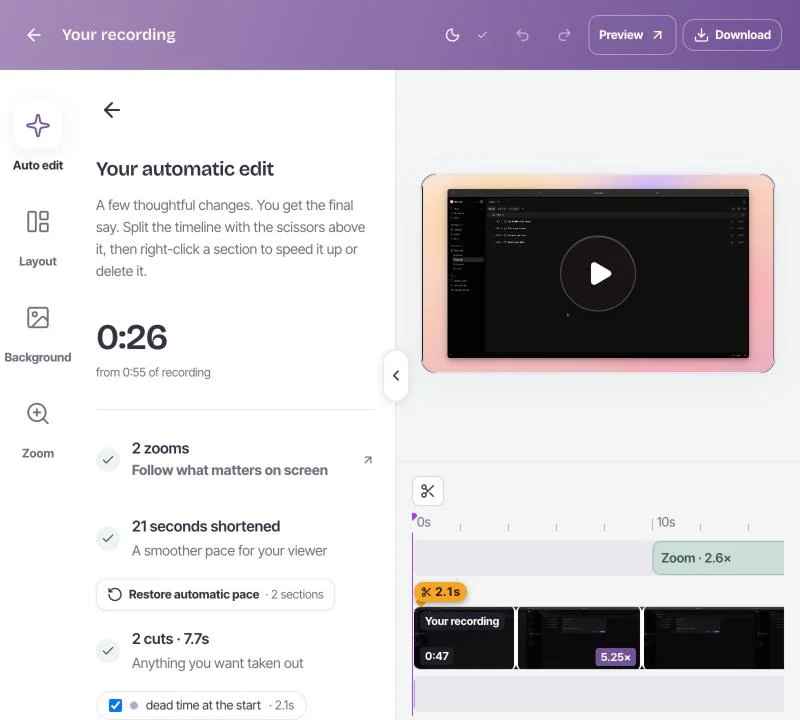
Rescreen starts from the other end. Stop recording and the edit is already done: dead time at each end, mistakes, retakes, filler words and silences cut, zooms into what you click, your voice levelled and noise reduced, still stretches sped up. You open a finished video, not a project.
Every edit can be changed: restore a cut, remove more words, or adjust a zoom. The original recording is kept.
Thirty minutes, or five hours
Clipchamp’s screen and camera recordings stop at 30 minutes each. For a longer training session or a full demo, you record in parts and join them on the timeline.
A Rescreen take can run for up to five hours, on the free plan, and you can record as many as you like. The link you share plays the edited video, and anyone can watch it without an account.
Price: both start free
Clipchamp is free, and its free exports go up to 1080p with no watermark. Premium, with 4K and premium stock and effects, comes with Microsoft 365 Personal at $9.99 a month or $99.99 a year.
Rescreen is free to record, edit and share. Pro adds downloads in 4K, 2K and HD for$10 a month billed $120 yearly, or $20 monthly. See pricing. If you need the file and not a link, Clipchamp gives it to you for free and Rescreen does not.
Where Clipchamp is ahead
Clipchamp is the better pick for a lot of videos, and it is worth being plain about which.
- Free downloads. 1080p files with no watermark on the free plan.
- Videos built from scratch. Stock footage, music, templates, text, effects and AI voiceovers for social posts, ads and slideshows.
- Microsoft 365. If you already pay for Personal or Family, Premium is included, and projects live in your OneDrive.
- Posting. Send a finished video straight to YouTube or TikTok.
If you are making a video rather than explaining something on your screen, Clipchamp is the stronger choice.
Frequently asked questions
Is Clipchamp free?
Yes. Clipchamp’s free plan exports as many videos as you like at up to 1080p with no watermark. Premium adds 4K exports and premium stock and effects, and comes with Microsoft 365 Personal ($9.99 a month or $99.99 a year) or Family ($12.99 a month or $129.99 a year). Checked 21 October 2026.
How long can you record in Clipchamp?
Each Clipchamp screen or camera recording can be up to 30 minutes, and you can make as many as you like. Rescreen records up to five hours a take, free.
Is there a Clipchamp alternative that edits a screen recording for you?
Rescreen does. When you stop recording it cuts dead time, mistakes, retakes, filler words and silences, zooms into what you click and levels your voice. Every edit can be changed. Recording, editing and sharing by link are free; downloads need Pro.
Try Rescreen free.
Free covers recording, editing and sharing. No card needed.