Rescreen / Alternatives / Loom
Rescreen vs Loom
Both record your screen and camera and give you a link to share. Loom records and shares. Rescreen records, edits the take for you and shares, and its free plan has no five-minute cap.
Pick Rescreen if
- You want the video cut and tidied when you stop recording, without paying for an AI plan.
- You record walkthroughs longer than five minutes, or more than 25 of them, and do not want to pay to do it.
- You would rather not install anything.
- You pay for yourself: Rescreen Pro is $10 / month billed yearly, Loom Business $15 / user / month and Business + AI $20.
Stay with Loom if
- You want a desktop app, speaker notes or a Chrome extension.
- Your team already works in Loom and Atlassian, with shared libraries, spaces and Jira or Confluence nearby.
- You want Loom to record your Zoom, Meet or Teams calls and write the notes.
- You share to prospects and want viewer insights, email-gated videos or a Salesforce integration.
Side by side
| Rescreen | Loom | |
|---|---|---|
| Price | Free. Pro is $10 / month billed $120 yearly, or $20 monthly. | Business is $15 / user / month billed yearly, or $18 monthly. Business + AI is $20 / user / month billed yearly, or $24 monthly. Enterprise is priced on request. |
| Free plan | Unlimited recordings up to five hours each, automatic editing, the full editor and sharing by link. Downloads need Pro. | Starter: 25 videos per person, five minutes each, up to 720p, up to 10 people. No trimming, no downloads, no filler-word or silence removal. |
| Platforms | Runs in the browser on any computer. Nothing to install. | A desktop app and a Chrome extension. The Chrome extension records up to 720p. |
| Automatic editing | Done when you stop recording: cuts mistakes, retakes, filler words and silences, zooms into what you do, reduces noise and levels your voice, speeds up still screens. | Titles are written for you on every plan. Filler-word and silence removal, summaries and chapters need Business + AI, and you run them after recording. |
| Editor | Change any automatic edit: restore a cut, remove more words, adjust zooms, speed, layout and background. | Trim and stitch on Business. Editing by transcript and text, box and arrow overlays on Business + AI. |
| Sharing | A link anyone can watch without an account. | A link with comments, emoji reactions and viewer insights. Password protection and email-gated videos on Business. |
| Download quality | 4K, 2K or HD on Pro. | Downloads need Business. Up to 4K on paid plans, 720p on Starter. |
Sources, checked 20 Oct 2026: Loom pricing and plan comparison · Loom desktop app and Chrome extension. Rescreen's from our pricing page.
Loom records. Rescreen also edits.
Stop recording in Loom and you have the take as you recorded it, with a link to share. Cutting a mistake needs Business, and taking out filler words and silences needs Business + AI, where you run it as a step after recording.
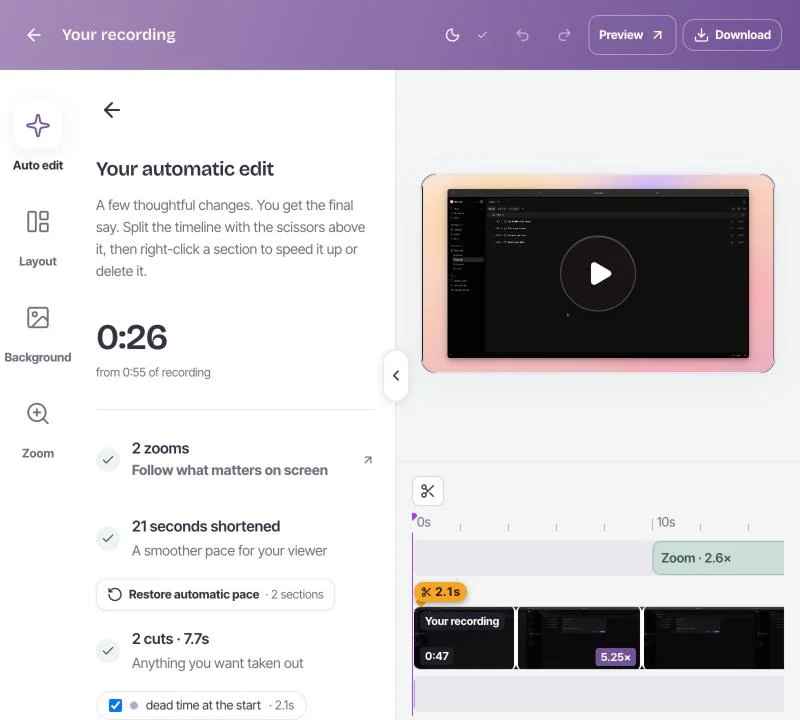
Stop recording in Rescreen and the edit starts on its own. It cuts the dead time, mistakes, retakes, filler words and silences, zooms into what you click, levels your voice and speeds up stretches where the screen is still. You open a finished video, on the free plan.
Every Rescreen edit can be changed: restore a cut, remove more, or adjust a zoom. The original recording is kept.
Free, without the five-minute cap
Loom’s free Starter plan gives each person 25 videos of up to five minutes, at up to 720p. It has no trimming and no downloads. A walkthrough that runs to six minutes needs a paid plan or two videos.
Rescreen is free to record, edit and share, with unlimited recordings up to five hours each. Pro adds downloads in 4K, 2K and HD for $10 a month billed $120 yearly, or $20 monthly. See pricing.
Loom pricing, plan by plan
Prices for one person, in US dollars before tax, from Loom’s pricing page on 20 October 2026.
| Plan | Billed yearly | Billed monthly | What it adds |
|---|---|---|---|
| Starter | Free | Free | 25 videos of five minutes, 720p, up to 10 people |
| Business | $15 / user / month ($180 a year) | $18 / user / month | Unlimited videos and length, trim and stitch, downloads, 4K, no Loom branding |
| Business + AI | $20 / user / month ($240 a year) | $24 / user / month | Filler-word and silence removal, editing by transcript, summaries, chapters, meeting notes |
| Enterprise | On request | SSO and SCIM, retention rules, Salesforce, uptime SLA | |
Paying yearly saves about 17%. A team of five on Business + AI pays $1,200 a year. The same five on Rescreen pay nothing to record, edit and share, or $120 a year each for 4K downloads.
Where Loom is ahead
Loom is the better fit in a few cases, and it is worth being plain about them.
- A desktop app. Loom records from a desktop app with speaker notes, or from a Chrome extension. Rescreen runs in the browser only.
- Teams already in Atlassian. Shared and team libraries, spaces, and Loom sold alongside Jira and Confluence.
- Meetings. Loom records Zoom, Google Meet and Teams calls, and Business + AI writes the notes and recap.
- Sales follow-up. Viewer insights, email-gated videos, and a Salesforce integration on Enterprise.
If those matter more than getting a finished video without editing, Loom is the stronger choice. To weigh more than two tools, read our guide to seven Loom alternatives.
Frequently asked questions
Is Loom free?
Loom has a free Starter plan: 25 videos per person, up to five minutes each, at up to 720p, for teams of up to 10. It has no trimming, no downloads and no filler-word or silence removal. Rescreen’s free plan has unlimited recordings up to five hours each, with automatic editing and sharing.
How much does Loom cost?
Loom Business is $15 per user per month billed yearly ($180), or $18 billed monthly. Business + AI is $20 per user per month billed yearly ($240), or $24 monthly. Enterprise is priced on request. Checked 20 October 2026.
Can Loom remove filler words and silences?
Yes, on Business + AI, the $20 per user per month plan billed yearly. You run it after recording. Rescreen removes filler words, silences and mistakes on its free plan, automatically, when you stop recording.
What is a good free Loom alternative?
Rescreen, if you want a link to share and a video that is already edited, for free and with nothing to install. For a local recording with full control and no hosting, OBS Studio. Our Loom alternatives guide compares seven options.
Try Rescreen free.
Free covers recording, editing and sharing. No card needed.