Rescreen / Alternatives / OBS Studio
Rescreen vs OBS Studio
OBS Studio is free, open source and built for streaming, with scenes, sources and an audio mixer to set up before you record. Rescreen runs in the browser: share your screen, talk, stop, and the take is edited and ready to share by link.
Pick Rescreen if
- You want to record a walkthrough without setting up scenes, sources and output settings first.
- You want the take edited for you: dead time, mistakes, silences and filler words cut, zooms on what you click.
- You want to send a link when you stop, not find a file and upload it somewhere.
- You cannot install apps on your work computer. Rescreen runs in the browser.
Stay with OBS Studio if
- You stream live.
- You want everything free, including the file. OBS saves recordings to your computer at no cost; Rescreen downloads need Pro.
- You switch scenes, cameras, capture cards and overlays while you record.
- You want recordings to stay on your computer and work offline.
Side by side
| Rescreen | OBS Studio | |
|---|---|---|
| Price | Free. Pro is $10 / month billed $120 yearly, or $20 monthly. | Free and open source. No paid plan. |
| Free plan | Unlimited recordings up to five hours each, automatic editing, the full editor and sharing by link. Downloads need Pro. | Everything: unlimited recording and live streaming, no watermark, no account. |
| Platforms | Runs in the browser on any computer. Nothing to install. | Desktop app for Windows 10 and 11, macOS 13 or newer, and Linux. |
| Automatic editing | Done when you stop recording: cuts mistakes, retakes, filler words and silences, zooms into what you do, reduces noise and levels your voice, speeds up still screens. | None. OBS records what you set up; cutting and zooming happen in another editor. |
| Editor | Change any automatic edit: restore a cut, remove more words, adjust zooms, speed, layout and background. | No video editor. Scenes, sources, transitions and an audio mixer with filters such as noise suppression, noise gate and gain, set up before you record. |
| Sharing | A link anyone can watch without an account. | No sharing. Recordings are files on your computer, or you stream live. |
| Download quality | 4K, 2K or HD on Pro. | Records straight to a file on your computer, at the resolution and frame rate you set. |
Sources, checked 21 Oct 2026: OBS Studio home page: features and platforms · OBS Studio download page. Rescreen's from our pricing page.
Nothing to set up
OBS is built for streaming. Before your first recording you add a scene, add sources for your screen, camera and microphone, check the audio mixer and choose where and how the file is saved. That power is the point of OBS, and it is a lot for a two-minute walkthrough.
Rescreen runs in the browser. Pick a screen, window or tab, choose your camera and microphone, and record. There is nothing to install, so it also works on a work computer where you are not allowed to add apps.
Edited when you stop
OBS gives you the raw recording. Cutting the start and end, taking out a mistake or zooming in on a small button happens in another editor.
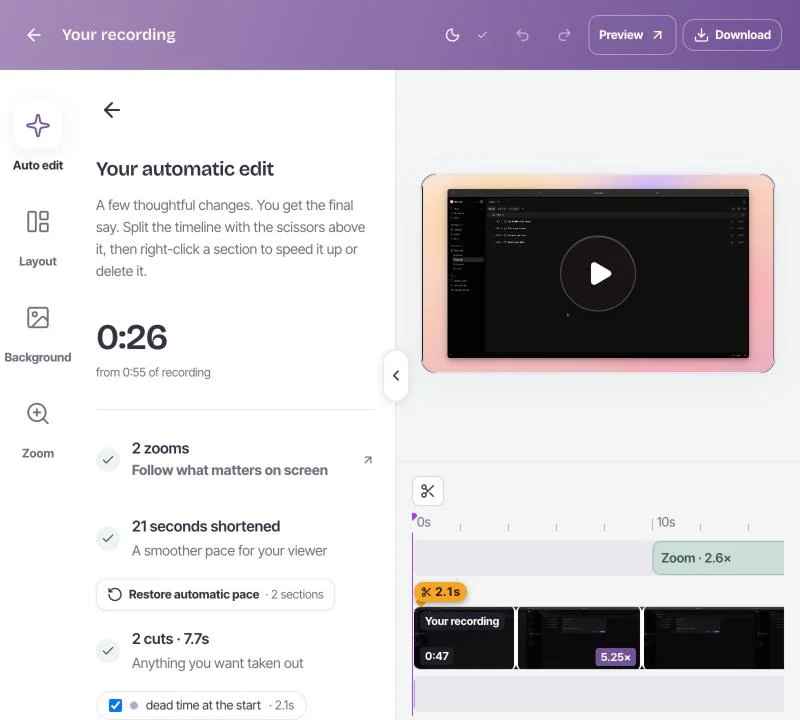
Rescreen does it for you. Stop recording and it cuts the dead time at each end, mistakes, retakes, filler words and silences, zooms into what you click, levels your voice and reduces noise. Every edit can be changed, and the original recording is kept.
A link, not a file
An OBS recording is a file on your computer. To show it to someone you upload it somewhere first.
A Rescreen recording is a link as soon as it is edited, and anyone can watch it without an account. Recording, editing and sharing are free. Pro adds downloads in 4K, 2K and HD for$10 a month billed $120 yearly, or $20 monthly. See pricing.
Where OBS is ahead
OBS is one of the best free programs there is, and for many jobs it is the right one.
- Live streaming. Rescreen does not stream.
- Free files. Every recording is saved to your computer at no cost, at the resolution and frame rate you choose. Rescreen downloads need Pro.
- Live production. Scenes, transitions, several cameras, capture cards, overlays and plugins, switched while you record.
- On your computer. Nothing is uploaded and it works offline. Rescreen edits in the cloud.
If you stream, produce a show or want every file free, keep OBS. If you want a walkthrough recorded, edited and shared in minutes, Rescreen is the shorter path.
Frequently asked questions
Is there an easier alternative to OBS for screen recording?
Yes. If you only need to record your screen, camera and voice, a browser recorder such as Rescreen has nothing to set up: share a screen, window or tab, record, and stop. Rescreen then edits the take for you and gives you a link to share.
Is OBS free?
Yes. OBS Studio is free and open source, with no paid plan, no watermark and no limit on recording or streaming. It runs on Windows 10 and 11, macOS 13 or newer, and Linux.
Does OBS have a video editor?
No. OBS records and streams. To trim, cut mistakes or add zooms you open the file in another editor. Rescreen does that editing for you when you stop recording, and every edit can be changed.
Try Rescreen free.
Free covers recording, editing and sharing. No card needed.