Rescreen / Alternatives / Vidyard
Rescreen vs Vidyard
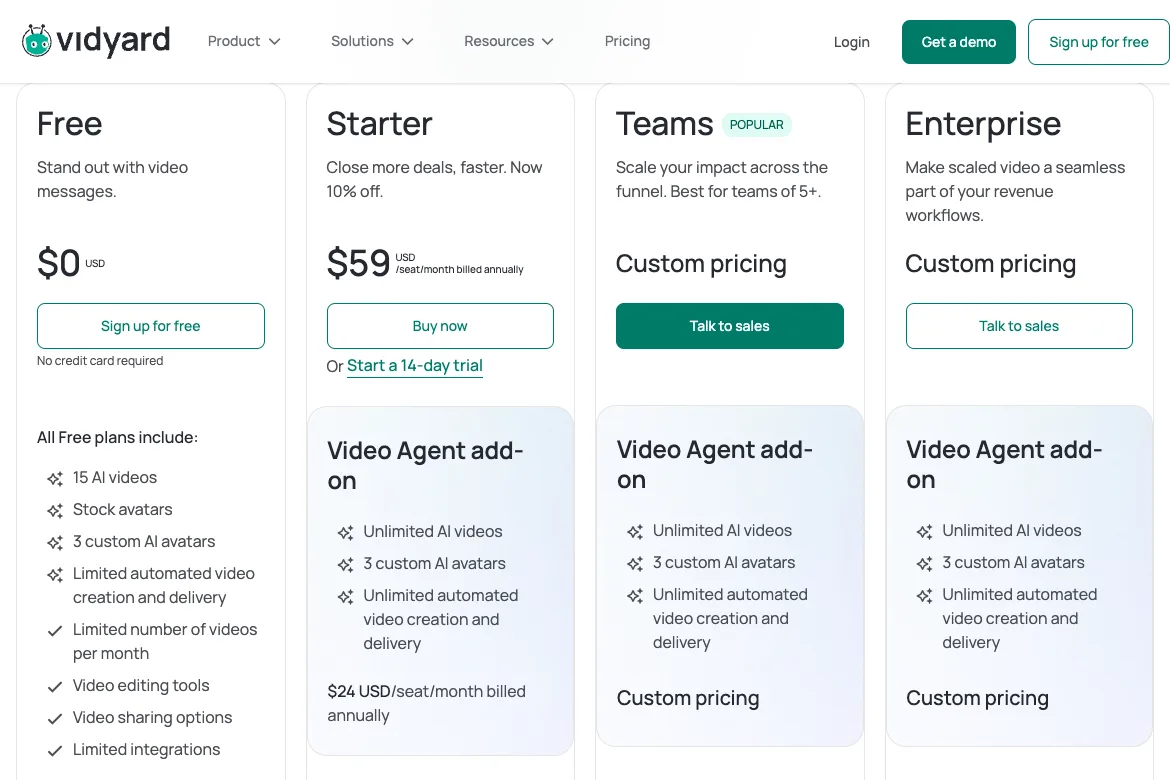
Vidyard is free for 5 videos a month of up to 30 minutes each, and Starter is $59 per seat a month billed yearly. Vidyard is built for sales teams; Rescreen is a free recorder that cuts your mistakes so a one-to-one video looks polished.
Rescreen is our product. We checked Vidyard’s plans and features on 12 Nov 2026.
Choose Rescreen if
- You send one-to-one videos and want the mistakes, pauses and filler words cut before anyone sees them.
- You record more than five videos a month, or longer than 30 minutes, and do not want to pay per seat to do it.
- You do not need a CRM integration or watch alerts, just a link that plays.
- You pay for yourself: Rescreen Pro is $10 / month billed yearly, Vidyard Starter $59 / seat / month.
Choose Vidyard if
- Your team sells with video and wants views logged in Salesforce, HubSpot or a sales engagement tool.
- You want to know who watched, and to be told when they do.
- You want branded sharing pages, call-to-action buttons and password-protected videos.
- You want AI avatars or videos made and sent for you, with the Video Agent add-on.
Side by side
| Rescreen | Vidyard | |
|---|---|---|
| Price | Free. Pro is $10 / month billed $120 yearly, or $20 monthly. | Starter is $59 / seat / month billed yearly, or $89 monthly. Teams and Enterprise are priced on request. The Video Agent add-on is $24 / seat / month billed yearly on Starter, or $29 monthly. |
| Free plan | Recordings up to five hours each, 2 GB of storage, automatic editing, the full editor and sharing by link. Downloads and 100 GB of storage need Pro. | 5 videos a month, up to 30 minutes each, and 15 AI videos. No downloads, captions or call-to-action buttons. |
| Platforms | Runs in the browser on any computer. Nothing to install. | A Chrome or Edge extension, and desktop apps for Mac and Windows. |
| Automatic editing | Done when you stop recording: cuts mistakes, retakes, filler words and silences, zooms into what you do, reduces noise and levels your voice, speeds up still screens. | None for recordings. AI avatars and the Video Agent add-on make videos from a script instead of a recording. |
| Editor | Change any automatic edit: restore a cut, remove more words, adjust zooms, speed, layout and background. | Trim a recording and stitch takes together. Custom thumbnails; custom backgrounds and captions on paid plans. |
| Sharing | A link anyone can watch without an account. | A link or an embed. Viewer analytics, branded sharing pages, call-to-action buttons and password protection from Starter; CRM integrations from Teams. |
| Download quality | 4K, 2K or HD on Pro. | Downloads need a paid plan. Records up to 4K. |
Sources, checked 12 Nov 2026: Vidyard pricing and plan comparison · Vidyard free screen recorder: limits, apps and downloads. Rescreen's from our pricing page.
Vidyard pricing, plan by plan
Vidyard costs $59 per seat a month on Starter billed yearly, or $89 billed monthly, and has a free plan. Teams and Enterprise are sold through Vidyard’s sales team with no price on the page. Prices are in US dollars before tax, from Vidyard’s pricing page on 12 November 2026.
| Plan | Billed yearly | Billed monthly | What it adds |
|---|---|---|---|
| Free | Free | Free | 5 videos a month of up to 30 minutes, 15 AI videos, sharing by link |
| Starter | $59 / seat / month ($708 a year) | $89 / seat / month | Unlimited recording, analytics, branded sharing page, call-to-action templates, password protection, captions, downloads |
| Teams | On request | Two data integrations, such as a CRM, custom call-to-action buttons, video hubs, scheduling and expiry | |
| Enterprise | On request | Unlimited integrations, the API, SSO, custom permissions | |
The Video Agent add-on, which makes and sends AI videos when a buyer takes an action, is $24 per seat a month on Starter billed yearly, or $29 monthly. Starter has a 14-day trial. Paying yearly saves about a third: a team of five on Starter pays $3,540 a year, or $5,340 paying month to month.
Is Vidyard free?
Yes, with limits. The free plan records 5 videos a month, each up to 30 minutes, and makes 15 AI videos. It needs no credit card. Downloads, captions, viewer analytics, branded sharing pages and call-to-action buttons all start on Starter.
Rescreen’s free plan has no monthly video count: recordings up to five hours each, 2 GB of storage, automatic editing and sharing by link. Downloads in 4K, 2K and HD need Pro, at $10 a month billed $120 yearly, or $20 monthly. See Rescreen pricing.
Vidyard, Loom and Rescreen for sales video
Three ways to send a prospect a video, compared on what a seller needs. Prices are for one person, billed yearly, checked 12 November 2026. Rescreen is our product.
| Feature | Vidyard | Loom | Rescreen |
|---|---|---|---|
| Price, one seller | $59 / month on Starter | $15 / month on Business, $20 with AI | Free, or $10 / month for downloads |
| Free plan | 5 videos a month, up to 30 minutes | 25 videos, up to five minutes, 720p | Recordings up to five hours, 2 GB of storage |
| CRM integrations | Salesforce, HubSpot, Marketo and others, from Teams | Salesforce, on Enterprise | None |
| Viewer analytics | Who watched, alerts when they do, team reports, from Starter | Viewer insights; ask for an email to view, on Business | Views, how much was watched and where viewers stop, on Pro |
| Personalisation | Custom thumbnails, call-to-action buttons, AI avatars, AI videos sent for you | Custom thumbnails, call-to-action buttons | Backgrounds and camera layouts; you record each video yourself |
| Editing | Trim and stitch | Trim and stitch on Business; filler words and silences removed on Business + AI, when you run it | Mistakes, retakes, filler words and silences cut, zooms added, when you stop. Every edit can be undone. |
| Recording | Chrome or Edge extension, Mac and Windows apps | Desktop app, Chrome extension | In the browser, nothing to install |
Sources: Vidyard pricing, Loom pricing and Rescreen pricing. More on Loom’s plans in our Loom pricing guide.
Loom vs Vidyard
Loom is the cheaper and more general of the two; Vidyard is built for sales teams. Loom Business is $15 per person a month billed yearly, against $59 for Vidyard Starter, and Loom is sold alongside Jira and Confluence for teams that record walkthroughs and updates for each other.
Vidyard puts more into what happens after the video is sent: viewer analytics, team performance reports, branded sharing pages, video hubs, and integrations with CRMs and sales engagement tools. Loom’s Salesforce integration is on Enterprise only, where Vidyard connects two tools on Teams and any number on Enterprise.
For a sales team that lives in Salesforce or HubSpot and wants video in the pipeline, Vidyard fits better. For a team that sends videos to colleagues as often as to buyers, Loom costs less. Our Rescreen vs Loom page compares Loom in more detail.
A polished video without editing it
A one-to-one video to a prospect works when it is short and clean. In Vidyard and Loom you get the take as you recorded it: the false start, the pause while a page loads, the “um” before the price. Fixing them means trimming by hand, or paying for Loom’s AI plan.
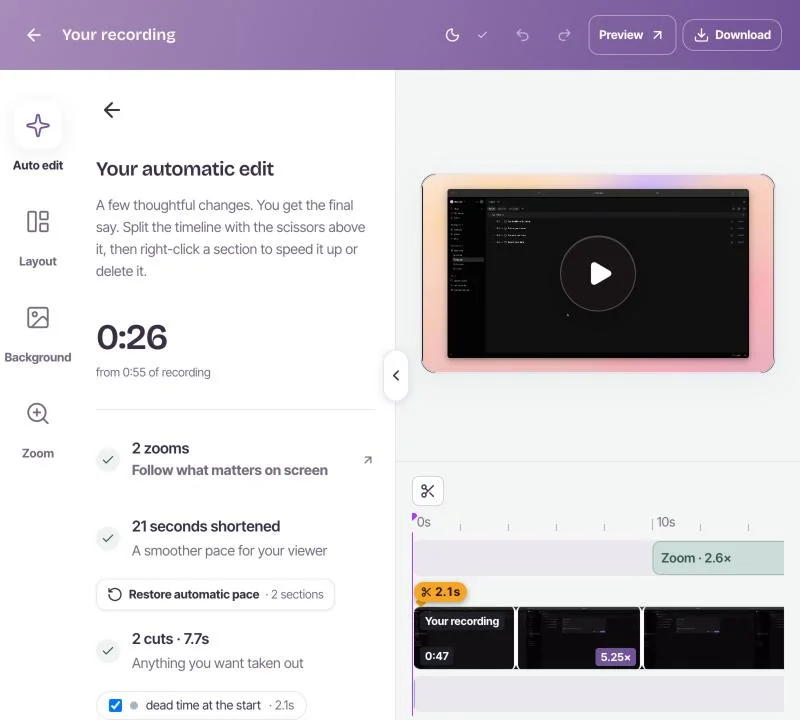
Rescreen edits the take when you stop. It cuts the mistakes, retakes, filler words and silences, zooms into what you click, and levels your voice. You open a finished video and send the link. Every edit can be changed, and the original is kept.
That suits a seller, founder or account manager who sends a handful of videos a week and does not need a full sales-video platform. A team that needs every view logged in the CRM still needs one.
Where Vidyard is ahead
Vidyard does several things Rescreen does not, and for a sales team they can matter more.
- Sales integrations. Video activity goes into Salesforce, HubSpot, Marketo, Gong and other tools. Rescreen has none.
- Analytics. Vidyard shows who watched and alerts you when they do, with reports for the whole team. Rescreen, on Pro, shows views, how much was watched and where viewers stop, with no alerts or team reports.
- Selling features. Branded sharing pages, call-to-action buttons, password protection, video hubs and scheduled expiry.
- AI videos at scale. AI avatars and the Video Agent make and send personalised videos for you.
- Desktop apps. Vidyard records from apps for Mac and Windows as well as a browser extension. Rescreen runs in the browser only.
If those are what your team buys video for, Vidyard is the better choice. If you want a clean video to a buyer without editing it yourself, and a free plan without a monthly cap, try Rescreen.
Frequently asked questions
What does Vidyard do?
Vidyard records and hosts videos for sales teams. Sellers record their screen and camera from a browser extension or desktop app, send the video by link or email, and see who watched. Paid plans add branded pages, call-to-action buttons, CRM integrations, AI avatars and automated video.
Is Vidyard free to use?
Yes, with limits. Vidyard’s free plan records 5 videos a month, up to 30 minutes each, with no credit card. Downloads, captions, analytics and call-to-action buttons need a paid plan. Checked 12 November 2026.
How much does Vidyard cost per month?
Vidyard Starter is $59 per seat per month billed yearly ($708 a year), or $89 billed monthly. Teams and Enterprise are priced by Vidyard’s sales team. The Video Agent add-on costs $24 per seat per month on Starter, billed yearly. Checked 12 November 2026.
What are some other websites that host videos besides YouTube?
For business video: Vimeo, Wistia, Vidyard, Loom and Rescreen all host a video behind a link you can share or embed, without ads. Vidyard and Loom are built around sending videos to people; Vimeo and Wistia around hosting videos on your own site.
What is better than Vimeo?
It depends on the job. To host marketing videos on your site, Wistia is the usual alternative. To send sales videos and track who watched, Vidyard. For quick screen recordings shared by link, Loom or Rescreen; Rescreen also cuts the mistakes for you.
What is the best free screen recorder?
For a video you will share by link, Rescreen: it is free, runs in the browser, records up to five hours and edits the take when you stop. For a file on your own computer with no account, OBS Studio. Vidyard’s and Loom’s free plans cap you at 5 videos a month and 25 videos of five minutes.
Send a polished video, free.
Free covers recording, editing and sharing. No card needed.