Rescreen / Alternatives / Scribe
Rescreen vs Scribe
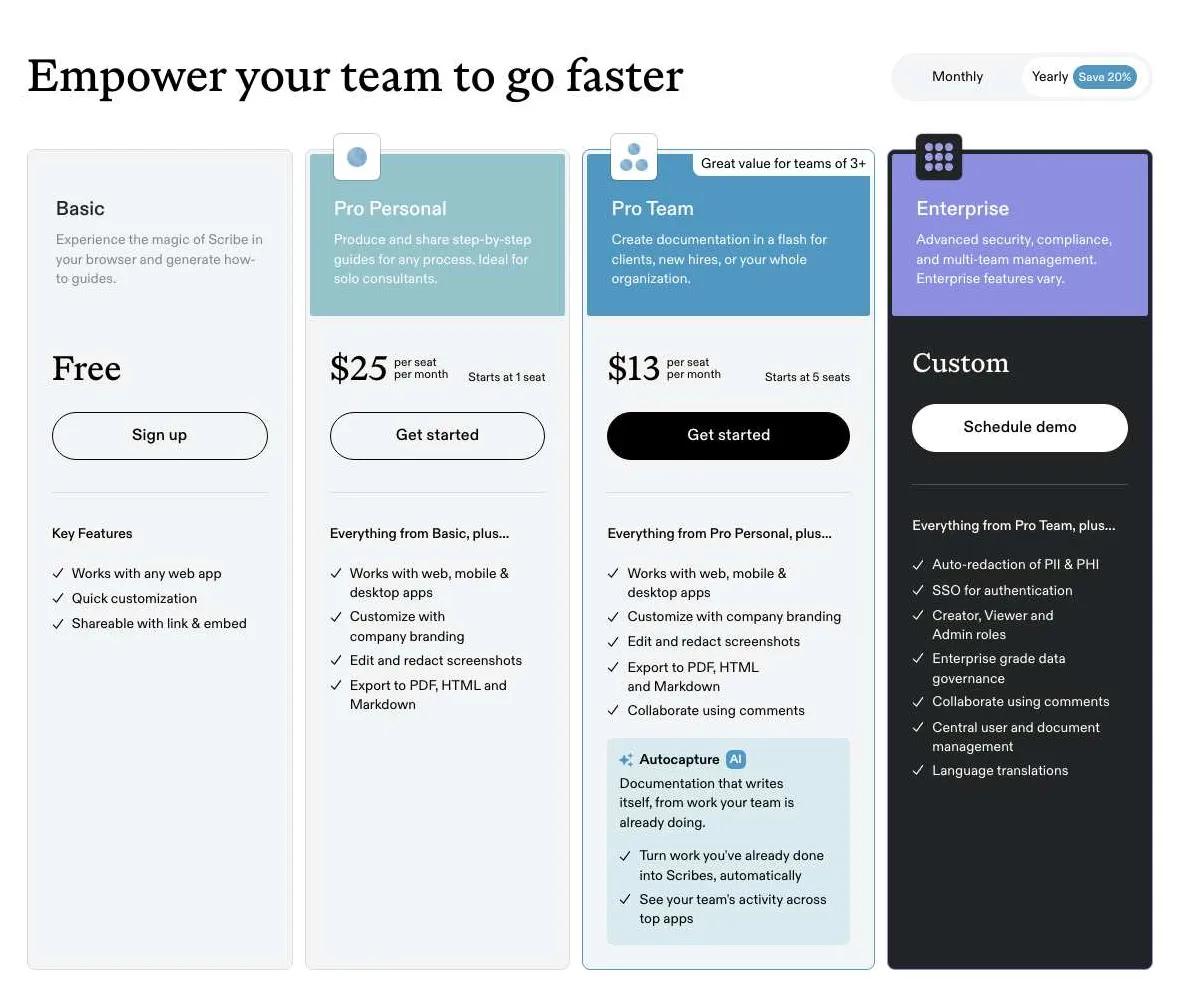
Tango makes the same step-by-step screenshot guides as Scribe, Guidde turns your clicks into a narrated video, and Rescreen records you doing the process and cuts it into a video ready to share. Scribe is free in the browser, and Pro starts at $25 per seat a month billed yearly.
Rescreen is our product. We checked Scribe’s plans and features on 12 Nov 2026.
Choose Rescreen if
- You want to show a process as you do it, in your own voice, and send one link.
- The process needs judgement a list of clicks leaves out: why you choose an option, what to check, what goes wrong.
- You do not want to edit: Rescreen cuts mistakes, pauses and filler words when you stop recording.
- You pay for yourself: Rescreen is free, or $10 / month billed yearly for downloads.
Choose Scribe if
- You want a written guide people can skim, search and follow one step at a time, with a screenshot for each.
- You need guides as PDF, HTML or Markdown for a knowledge base or a printed manual.
- You document desktop apps as well as web apps: Scribe Pro and Tango Pro capture outside the browser.
- You need to blur or redact what is on screen in each step.
Side by side
| Rescreen | Scribe | |
|---|---|---|
| Price | Free. Pro is $10 / month billed $120 yearly, or $20 monthly. | Pro Personal is $25 / seat / month billed yearly, or $35 monthly. Pro Team is $13 / seat / month billed yearly, or $17 monthly, from 5 seats. Enterprise is priced on request. |
| Free plan | Recordings up to five hours each, 2 GB of storage, automatic editing, the full editor and sharing by link. Downloads and 100 GB of storage need Pro. | Basic: guides captured in Chrome or Edge, shared by link or embed. Unlimited guides, desktop capture, branding, screenshot editing and exports need Pro. |
| Platforms | Runs in the browser on any computer. Nothing to install. | A Chrome or Edge extension. Desktop apps for Windows and Mac on Pro. |
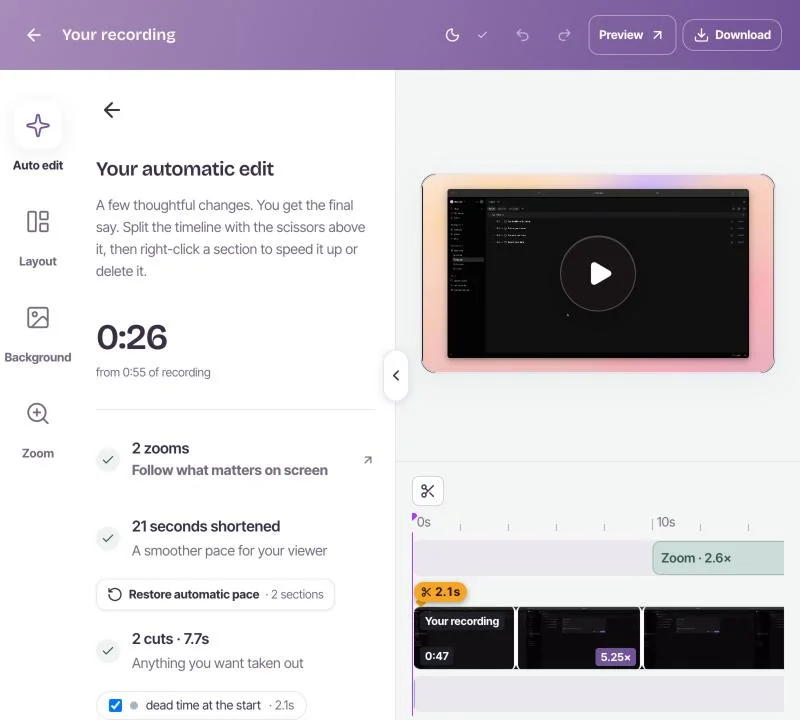
| Automatic editing | Done when you stop recording: cuts mistakes, retakes, filler words and silences, zooms into what you do, reduces noise and levels your voice, speeds up still screens. | Writes the guide as you click: a screenshot and a line of text for each step. It does not edit video. |
| Editor | Change any automatic edit: restore a cut, remove more words, adjust zooms, speed, layout and background. | Edit the text and the steps. Edit and redact screenshots, and add your branding, on Pro. |
| Sharing | A link anyone can watch without an account. | A link or an embed. Its plan table also lists sharing a guide as a video, on every plan. |
| Download quality | 4K, 2K or HD on Pro. | Guides export to PDF, HTML and Markdown on Pro. |
Sources, checked 12 Nov 2026: Scribe pricing and plan comparison · Tango pricing · Guidde pricing. Rescreen's from our pricing page.
Screenshot guide or video: which suits the process
Scribe and Tango watch you click through a task and write it up: one screenshot and one line of text per step. Rescreen records the task as a video, with your voice and, if you like, your camera. Both are ways to write a standard operating procedure; they suit different processes.
A screenshot guide is better when the reader will follow along at their own pace, skip to the step they are stuck on, or search for a word. Short, fixed tasks in one app, such as resetting a password or filing an expense, read well as a list. A guide is also easy to update one step at a time, and easy to print or paste into a knowledge base.
A video is better when the why matters as much as the clicks: choosing between options, checking a result, handling the case that goes wrong. It is also better for tasks that move across several tools, for new starters who need the whole picture before the steps, and for anything where tone helps, such as a handover to a client. Watching someone do it once answers questions a list of steps raises.
Many teams use both: a video to explain a process the first time, and a written guide as the reference people come back to.
Scribe alternatives compared
Four tools for documenting a process, compared on what an operations or training team needs. Prices are for one person, billed yearly, checked 12 November 2026. Rescreen is our product.
| Tool | Makes | Free plan | Paid, one person | Best for |
|---|---|---|---|---|
| Scribe | Step-by-step guides with screenshots, written as you click | Guides in Chrome or Edge, shared by link or embed | $25 / seat / month on Pro Personal ($35 monthly); $13 a seat on Pro Team, from 5 seats | Written SOPs for web and desktop software, exported to PDF, HTML or Markdown |
| Tango | Step-by-step guides with screenshots, written as you click | 5 shared workflows, browser capture, up to 10 users | $22 / user / month on Pro ($30 monthly); $15 a user from 3 users | The same job as Scribe for a small team, with guidance inside the app |
| Guidde | How-to videos from captured steps, with an AI voiceover | Up to 25 how-to videos, with a Guidde watermark | $19 / creator / month on Pro ($29 monthly); $39 on Business | Narrated step videos without recording your own voice |
| Rescreen, which we make | A screen and camera recording, edited for you when you stop | Recordings up to five hours, 2 GB of storage, sharing by link | $10 / month on Pro ($20 monthly), for downloads and 100 GB | Explaining a process in your own words, in one take |
Sources: Scribe pricing, Tango pricing, Guidde pricing and Rescreen pricing. Prices are in US dollars before tax.
Scribe pricing, and is there a free version?
Scribe has a free plan, Basic, and two paid ones. Pro Personal is $25 per seat a month billed yearly, or $35 billed monthly, from one seat. Pro Team is $13 per seat a month billed yearly, or $17 monthly, with a minimum of five seats, so $780 a year at the least. Enterprise is priced on request and adds automatic redaction of personal data, SSO and roles.
Basic captures guides in the browser and shares them by link or embed. Scribe’s plan table marks unlimited guides, desktop capture, custom branding, screenshot editing and exports to PDF, HTML and Markdown as Pro features, and Pro keeps a week of version history.
Tango and Guidde, the other two
Tango is the nearest thing to Scribe: the same capture-as-you-click guides, a browser extension, and desktop capture on Pro. Pro costs $22 per user a month billed yearly for one or two users, or $30 monthly; from three users it is $15 a user billed yearly, or $20 monthly. The free plan keeps 5 shared workflows. Pro adds unlimited workflows, branding, voice and video embeds, exports, blurring and viewer insights; Enterprise adds guidance that appears inside the apps your team uses.
Guidde captures your clicks too, but makes a short video from them, with an AI voice reading each step. That suits teams who want video without recording their own voice. The free plan makes up to 25 videos. Pro is $19 per creator a month billed yearly, or $29 monthly, and removes the watermark; Business is $39 billed yearly, or $59 monthly, and adds desktop capture and analytics.
How to make a video SOP with Rescreen
- Open Rescreen in your browser, choose the screen or window, and turn your camera on or off.
- Do the task once at your normal pace, and say what you are doing and why as you go.
- If you slip, pause and say the line again. You do not need to stop and start over.
- Stop. Rescreen cuts the mistakes, retakes, filler words and long pauses, and zooms into what you click.
- Check the edit, restore anything it cut that you want back, and copy the link.
- Paste the link into your wiki, ticket or handbook next to the written steps, if you keep them.
Anyone with the link can watch without an account. When the process changes, record it again and replace the link.
Where Scribe and Tango are ahead
Rescreen does not make step-by-step screenshot documents. If that is what you need, Scribe or Tango is the better choice.
- Skimmable steps. A reader can jump to step seven, copy a value, or search the text. In a video they have to find the moment.
- Exports. PDF, HTML and Markdown on Pro, for a knowledge base, a printed manual or an audit trail.
- Editing one step. When a button moves, you change one screenshot, not the whole recording.
- Redaction. Blur or redact what is on screen in each step, and on Scribe Enterprise have personal data removed for you.
- Desktop apps. Scribe Pro and Tango Pro capture desktop software too. Rescreen records what you share from the browser: a tab, a window or the whole screen.
If the process is short and fixed, a screenshot guide does the job. If it needs explaining, record it once with Rescreen and share the link.
Frequently asked questions
Is there another app like Scribe?
Yes. Tango is the closest: it also turns your clicks into a step-by-step guide with screenshots, and has a free plan. Guidde captures the same clicks but makes a narrated video instead. Rescreen records you doing the task and edits the video for you.
Does Microsoft have a Scribe alternative?
Windows has Steps Recorder, which saves screenshots with a written list of your clicks, but Microsoft has marked it for removal and it has no editor or sharing. For a video instead, Windows 11’s Snipping Tool records the screen.
Is there a free version of Scribe?
Yes. Scribe Basic is free: it captures guides in Chrome or Edge and shares them by link or embed. Unlimited guides, desktop capture, branding, screenshot editing and PDF, HTML or Markdown exports need Pro, from $25 per seat a month billed yearly. Checked 12 November 2026.
Is Tango better than Scribe?
They do the same job and are close on features. Tango Pro is a little cheaper for one person, $22 a month billed yearly against Scribe’s $25, and costs $15 a seat from three people with no five-seat minimum. Tango’s free plan keeps 5 shared workflows. Try both on one real process.
Is Scribe worth the money?
If you write many guides for software and need exports, branding, redaction or desktop capture, Pro at $25 a month billed yearly, or $13 a seat for a team of five or more, can pay for itself quickly. For a few guides made in the browser, the free plan may be enough.
Is there a free version of Tango?
Yes. Tango Free keeps up to 5 shared workflows, captures in the browser, shares by link or embed and allows up to 10 users in a workspace. Pro removes the workflow limit and adds desktop capture and exports. Checked 12 November 2026.
Record a process once and share it.
Free covers recording, editing and sharing. No card needed.