Rescreen / Alternatives / Descript
Rescreen vs Descript
Descript edits audio and video by editing the transcript, and it records your screen too. Rescreen does one job: it records a screen walkthrough and edits it for you when you stop, with no hour limit on the free plan.
Pick Rescreen if
- Your videos are screen walkthroughs and you want them edited when you stop, not in an editing session.
- You record more than an hour a month. Descript’s free plan has one media hour; Rescreen’s has unlimited recordings up to five hours each.
- You want zooms on what you click without placing them yourself.
- You pay for yourself: Rescreen Pro is $10 / month billed yearly, Descript Hobbyist $16 and Creator $24.
Stay with Descript if
- You make podcasts or interviews and edit multitrack audio.
- You want to rework a long project by editing its transcript, with a timeline for fine control.
- You want AI voices or AI-generated video.
- Your team wants shared brand tools and seats on one plan.
Side by side
| Rescreen | Descript | |
|---|---|---|
| Price | Free. Pro is $10 / month billed $120 yearly, or $20 monthly. | Hobbyist is $16 / month billed yearly, or $24 monthly. Creator is $24 / month billed yearly, or $35 monthly. Business is $50 / month billed yearly, or $65 monthly. All per person. |
| Free plan | Unlimited recordings up to five hours each, automatic editing, the full editor and sharing by link. Downloads need Pro. | One media hour a month, 100 one-time AI credits and exports up to 720p, which its plan table lists with a watermark. Filler-word removal needs Hobbyist. |
| Platforms | Runs in the browser on any computer. Nothing to install. | Mac and Windows apps, and a browser version. |
| Automatic editing | Done when you stop recording: cuts mistakes, retakes, filler words and silences, zooms into what you do, reduces noise and levels your voice, speeds up still screens. | Transcribes every recording. Removing filler words, Studio Sound and the Underlord AI co-editor are tools you run, mostly on paid plans; Underlord uses AI credits. |
| Editor | Change any automatic edit: restore a cut, remove more words, adjust zooms, speed, layout and background. | Edit by transcript alongside a timeline: multitrack audio and video, scenes, captions and AI voices. |
| Sharing | A link anyone can watch without an account. | A Descript link with an embedded player. |
| Download quality | 4K, 2K or HD on Pro. | 720p on Free, 1080p on Hobbyist, 4K on Creator and Business. |
Sources, checked 21 Oct 2026: Descript pricing and plan comparison · Descript screen recorder. Rescreen's from our pricing page.
Edited for you, or edited by you
Descript turns a recording into a transcript, and you edit the video by editing the text: delete a sentence and the clip goes with it. Removing filler words, Studio Sound and the Underlord AI co-editor are tools you run, mostly on paid plans.
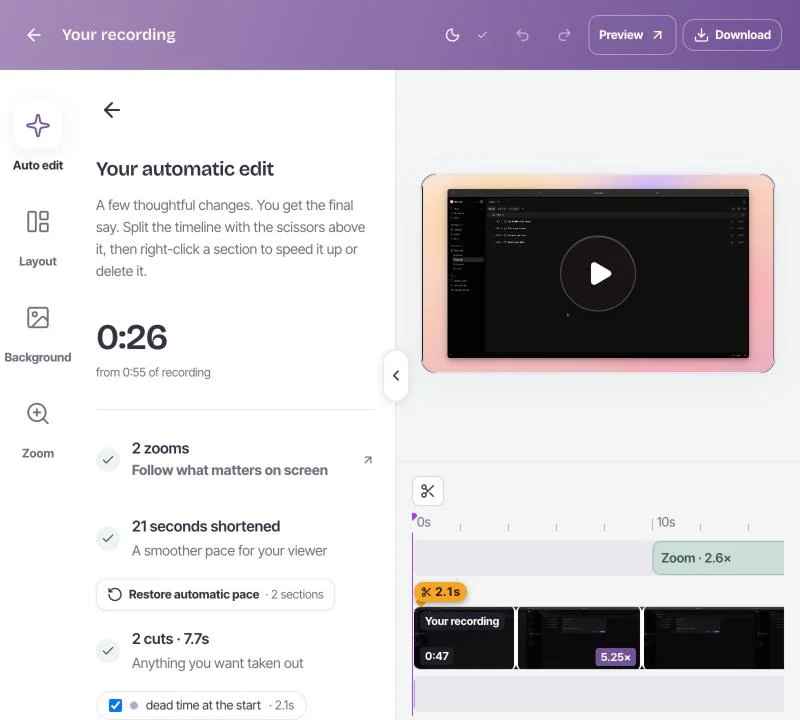
Rescreen does the first edit without being asked. Stop recording and it cuts the dead time, mistakes, retakes, filler words and silences, zooms into what you click, levels your voice and speeds up stretches where the screen is still. You can still fix it by the transcript: restore a cut, remove more words, or move a zoom.
Price: one hour a month, or no hour limit
Descript’s free plan has one media hour a month and exports up to 720p. Hobbyist is $16 a month billed yearly, or $24 monthly, for ten hours and 1080p. Creator is $24 a month billed yearly, or $35 monthly, for 30 hours and 4K.
Rescreen is free to record, edit and share, with unlimited recordings up to five hours each. Pro adds downloads in 4K, 2K and HD for $10 a month billed $120 yearly, or $20 monthly, with no hour allowance to watch. See pricing.
Where Descript is ahead
Descript does much more than screen recordings, and for that work it is the better tool.
- Podcasts and interviews. Multitrack recording and editing, with each speaker on their own track.
- Hands-on editing. Rework a long project through its transcript, with a timeline, scenes and layers for fine control.
- AI voices and generated video. Fix a word with an AI voice, or generate video on Creator and up.
- Teams. Seats, brand tools and priority support on Business.
If you edit spoken audio and video for a living, Descript is the stronger choice. To weigh more tools, read our guide to Descript alternatives by workflow, or our review, is Descript worth it?
Frequently asked questions
Can Descript record your screen?
Yes. Descript records your screen and camera in its Mac and Windows apps and in the browser, then transcribes the recording so you can edit it by editing the text. Its free plan includes one media hour a month.
Is Descript free?
Descript has a free plan with one media hour a month, 100 one-time AI credits and exports up to 720p, which its plan table lists with a watermark. Hobbyist is $16 a month billed yearly or $24 monthly. Checked 21 October 2026.
What is the difference between Rescreen and Descript?
Descript is an editor: you record or import audio and video and edit it through the transcript. Rescreen is a screen recorder that edits the take for you when you stop, cutting mistakes, filler words and silences and zooming into what you click. You can change any of those edits afterwards.
Try Rescreen free.
Free covers recording, editing and sharing. No card needed.