Rescreen / Alternatives / Screen Studio
Rescreen vs Screen Studio
Screen Studio is a polished Mac app, and there is no Windows version. Rescreen runs in the browser, so it works on Windows as well as Mac, zooms into what you click, and edits the rest of the take for you when you stop.
Pick Rescreen if
- You record on Windows as well as on a Mac, or your team uses both. Rescreen works the same in Chrome or Edge on either; Screen Studio runs only on macOS.
- You cannot install apps on your work computer, Mac or Windows. Rescreen runs in the browser, with nothing to install.
- You want the take cut for you as well as zoomed: dead time, mistakes, retakes, filler words and silences removed when you stop.
- You want to record, edit and share without paying. Screen Studio has no free plan listed on its site.
- You share by link and your videos run past 30 minutes. Rescreen’s links play recordings up to five hours, with no account needed to watch.
Stay with Screen Studio if
- You record on a Mac and want the most polished cursor: smoothed paths, motion blur, a larger cursor drawn in place of the real one.
- You record iPhone or iPad apps and want them framed in a device mockup.
- You want recordings processed on your own computer, with nothing uploaded unless you share.
- You export a lot in 4K at 60 fps, or as GIFs. Screen Studio’s yearly plan is $108 a year, a little under Rescreen Pro’s $120.
Side by side
| Rescreen | Screen Studio | |
|---|---|---|
| Price | Free. Pro is $10 / month billed $120 yearly, or $20 monthly. | Every feature on every plan: $9 / month billed yearly ($108), or $29 monthly. One-time licenses are no longer sold. 40% off for students and educators. |
| Free plan | Unlimited recordings up to five hours each, automatic editing, the full editor and sharing by link. Downloads need Pro. | No free plan listed on its site. |
| Platforms | Runs in the browser on any computer. Nothing to install. | macOS only, built for Apple silicon; macOS Ventura 13.1 or later recommended. No Windows version, and none planned. Records iPhone and iPad over USB. |
| Automatic editing | Done when you stop recording: cuts mistakes, retakes, filler words and silences, zooms into what you do, reduces noise and levels your voice, speeds up still screens. | Zooms on your clicks, smoothed cursor movement and motion blur as you record. Filler words and long pauses removed in one pass when you run it. Noise reduction on your Mac. |
| Editor | Change any automatic edit: restore a cut, remove more words, adjust zooms, speed, layout and background. | Edit by transcript, manual zooms, cursor styles, camera layouts and background removal, captions, presets for teams. |
| Sharing | A link anyone can watch without an account. | Links that play in the browser, with comments and view counts, at 1080p and 60 fps for videos up to 30 minutes. |
| Download quality | 4K, 2K or HD on Pro. | MP4 at 720p, 1080p or 4K, up to 60 fps. GIF up to 1080p. |
Sources, checked 21 Oct 2026: Screen Studio home page: features, pricing and FAQ. Rescreen's from our pricing page.
Screen Studio for Windows? Use your browser
Screen Studio is a Mac app. It is built for Apple silicon, and its FAQ is plain that there is no Windows version on the way. If you record on a Windows laptop, or your team uses both, it is not an option.
Rescreen runs in the browser. Open it in Chrome or Edge on Windows or a Mac, share your screen, window or tab, and record with your camera and microphone. There is nothing to install, so it also works on a work computer where you are not allowed to add apps.
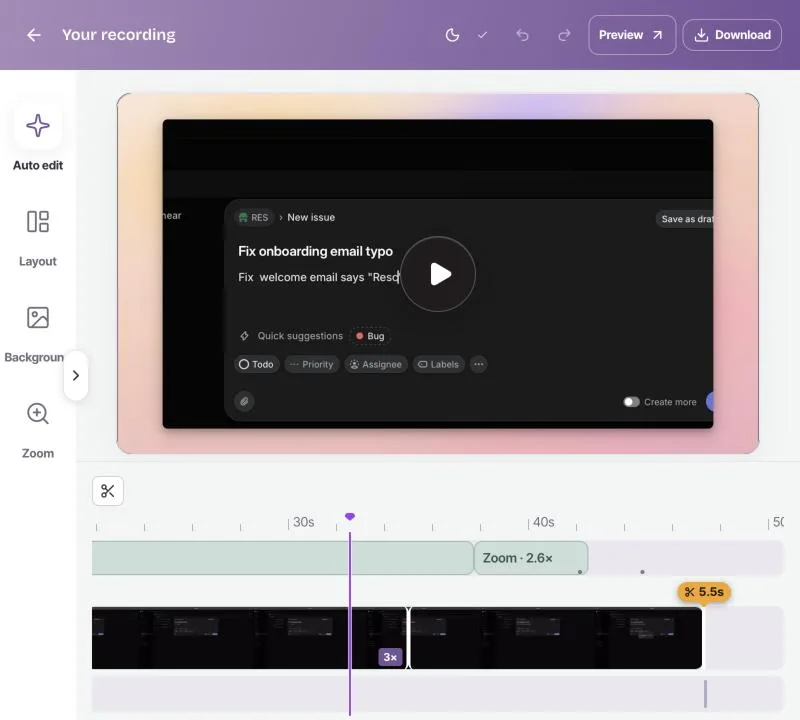
The zooms come with it. While you record, Rescreen follows the cursor in the picture and works out where you click. When you stop, it zooms in on those moments and eases back out, the way Screen Studio does. Each zoom can be moved, resized or deleted.
More than zooms: the take is edited when you stop
Screen Studio makes a screen look good: zooms, a smooth cursor, a background. Taking out filler words and long pauses is a step you run in its editor.
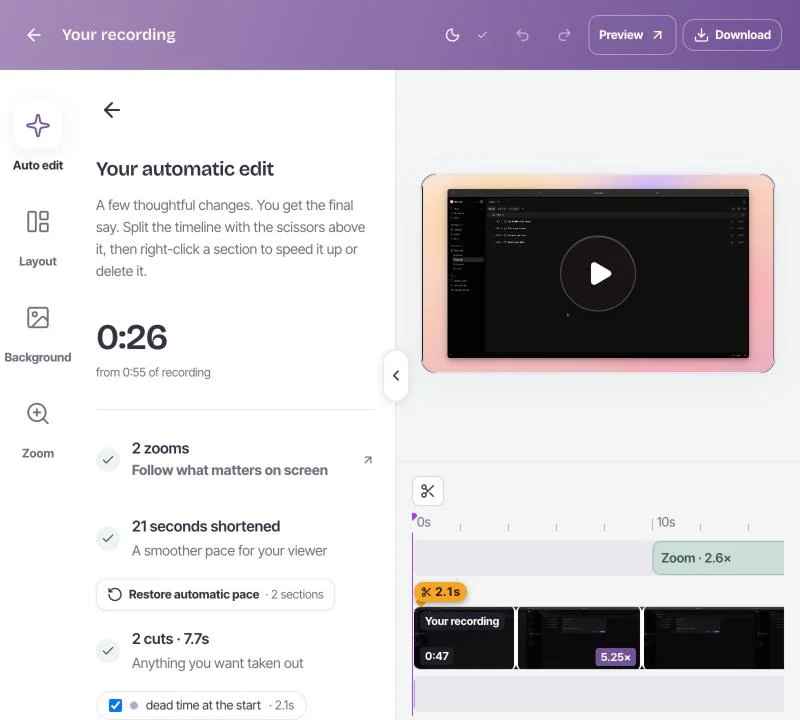
Rescreen does the zooms and the cutting together. Stop recording and it removes the dead time at each end, mistakes, retakes, filler words and silences, levels your voice and reduces noise, and speeds up stretches where the screen is still. You open a finished video, not a project to clean up.
Every edit can be changed: restore a cut, remove more words, or adjust a zoom. The original recording is kept.
Price: a free plan against a subscription
Screen Studio is $9 a month billed yearly ($108), or $29 a month billed monthly. Every feature is on both. It used to sell one-time licenses; new buyers can no longer get one. There is no free plan listed on its site.
Rescreen is free to record, edit and share, with unlimited recordings up to five hours each. Pro adds downloads in 4K, 2K and HD for $10 a month billed $120 yearly, or $20 monthly. See pricing.
If you pay yearly for downloads, Screen Studio is $12 a year cheaper. If you pay month to month, Rescreen is $9 a month cheaper. If you mostly share links, Rescreen costs nothing.
Where Screen Studio is ahead
Screen Studio is a very good Mac app, and on a Mac there are good reasons to keep it.
- The cursor. It records the real mouse, then smooths the path, adds motion blur and draws a larger cursor in its place. A browser cannot remove the system cursor from a recording, so Rescreen's cursor stays the size it was.
- iPhone and iPad. It records a device over USB and frames it in a mockup.
- Everything on your Mac. Recordings are stored and processed locally, and nothing is uploaded unless you share it. Rescreen edits in the cloud.
- Exports. 4K at 60 fps, GIFs, and captions in several styles.
If you record on a Mac and those matter more than getting a cut, finished video, Screen Studio is the stronger choice. To weigh more than two tools, read our guide to eight Screen Studio alternatives for Windows and Mac.
Frequently asked questions
Is there a Screen Studio for Windows?
No. Screen Studio runs only on macOS, and its FAQ says there are no near-future plans for Windows. Rescreen runs in the browser, so it works in Chrome or Edge on Windows and on a Mac with nothing to install, and adds automatic zooms on what you click.
How much does Screen Studio cost?
Screen Studio is $9 per month billed yearly ($108 a year), or $29 billed monthly, with every feature on both. Students and educators get 40% off. Checked on screen.studio on 21 October 2026.
Can I still buy Screen Studio once?
No. Screen Studio used to sell one-time licenses and says they still work for people who bought them, but new buyers get a monthly or yearly plan.
Is there a free Screen Studio alternative?
Rescreen is free to record, edit and share, with automatic zooms, cuts and a share link, in the browser on Windows or Mac. Downloads need Pro. OpenScreen is a free, open-source desktop app with zooms. Our guide to Screen Studio alternatives compares eight options.
Try Rescreen free.
Free covers recording, editing and sharing. No card needed.